AI Agents Are Taking Over: 10 AI Tools That Can Do Your Work in 2026
Nexibook Team
October 30, 2026
5:36 pm
0 comments
AI Automation · Beginner's field guide · Updated October 2026
Meet the AI tools that can move work forward
Imagine asking software to research a topic, organize the findings, draft a report, and wait for your approval—all as one assignment. That's the promise of AI agents. But which tools can actually help, and how do you begin without risking your data?
This practical guide explains the fundamentals, introduces ten tools and platforms, and walks you through a safe first project. No programming experience is required for the beginner workflow.
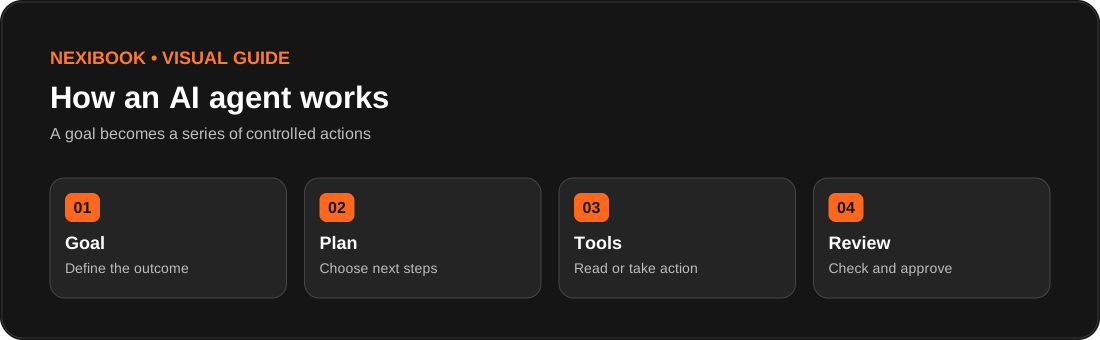
An AI agent is software that works toward a goal by deciding what steps to take and using tools to carry them out. A typical agent combines an AI model (to interpret and plan), tools (to search, read files, or update apps), and instructions (to define its boundaries).
Think of a chatbot as a helpful person who answers questions. An agent is closer to an assistant who can work through a task. Not every product labeled “AI” is an autonomous agent, and not every agent can act without your approval.
Illustration: a simplified agent loop. Real agents may repeat planning and tool use several times.
Type
What it does
Example
Chatbot
Responds to your prompts
Explains how to write a client email
Fixed automation
Follows predefined rules
When a form arrives, add a spreadsheet row
AI agent
Chooses steps and uses connected tools within permissions
Researches a lead, drafts an outreach message, and asks for approval
Important: “AI agents are taking over” is a catchy headline, not a claim that humans are obsolete. Agents can save time, but they still make mistakes and need oversight.
10 AI tools and platforms worth exploring in 2026
These are different kinds of tools: ready-to-use assistants, business automation systems, and developer frameworks. Availability, features, regional access, and pricing can change. Choose based on the job you need done—not the biggest feature list.
01 · GENERAL WORK ASSISTANT
ChatGPT Work — multi-step research and deliverables
What it helps with: Researching a subject, organizing information, navigating supported websites, and preparing finished outputs. It is a useful starting point when your work involves several related steps.
Beginner project: Ask it to compare three website builders using official documentation, then produce a decision table with source links. Review the facts before publishing.
Watch out: Available capabilities depend on plan, tools, and permissions. Explore ChatGPT.
02 · RESEARCH & WRITING
Claude — documents, analysis, and coding assistance
What it helps with: Working through lengthy documents, structured writing, technical tasks, and coding workflows. Agentic capabilities depend on the Claude product and connected tools.
Beginner project: Supply a fictional client brief and ask for a website content plan, missing requirements, and a review checklist.
Watch out: Treat generated code as a draft; test before deployment. Explore Claude.
03 · GOOGLE WORKSPACE
Gemini — assistance across Google workflows
What it helps with: Working with documents, email, spreadsheets, and business knowledge where supported. Google's 2026 Gemini agent announcement describes planning and tool use across connected work systems.
Beginner project: Turn meeting notes into an action list and draft a follow-up document.
Watch out: Organization controls and product availability matter. Explore Gemini.
04 · OFFICE PRODUCTIVITY
Microsoft Copilot — Microsoft 365 workflows
What it helps with: Drafting, summarizing, and working across Microsoft productivity tools; Copilot Studio supports building customized agents for organizations.
Beginner project: Prepare a meeting recap and task list from an approved sample document.
Watch out: Different Copilot products have different licenses and integrations. Explore Copilot.
05 · NO-CODE AUTOMATION
Zapier — connect actions across apps
What it helps with: Connecting software and building automations, including AI-assisted steps and agent-style workflows.
Beginner project: When a test form is submitted, summarize its contents and save a draft response for review.
There is no single “best” tool for everyone. Test one small workflow before paying for a larger plan.
Your first AI agent project: a weekly research assistant
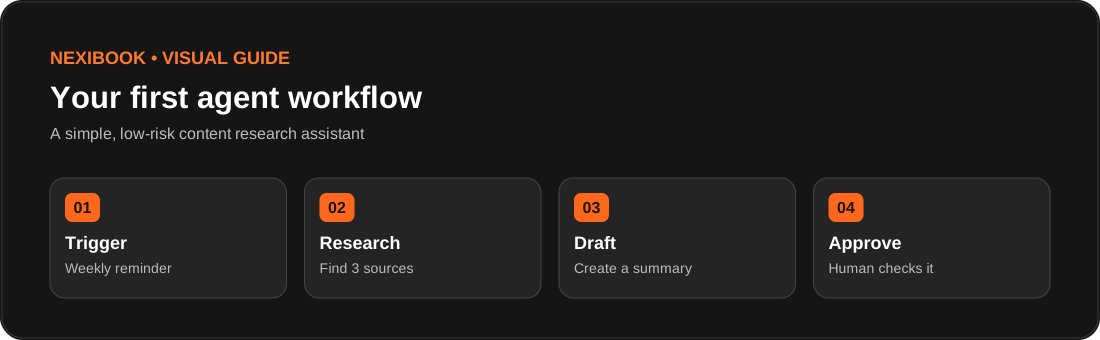
Let's build a useful beginner workflow: every week, collect three credible articles about a topic, summarize them, and prepare a draft newsletter. The system must not publish or email anything without your approval.
Example workflow: trigger, research, draft, human approval.
Step 1 — Define a narrow outcome
Pick a topic such as “AI website design updates.” Ask for exactly three useful sources and a 300-word draft. Specific outputs are easier to evaluate than “do all my marketing.”
Step 2 — Choose a platform
For a manual trial, use an AI assistant with supported research capabilities. For a scheduled version, choose a workflow platform such as Zapier, Make, or n8n and connect only the services needed.
Step 3 — Create a safe test
Use a test document or draft folder. Avoid client data, financial records, and production publishing permissions.
Copy this beginner prompt
You are my research assistant. Find three credible, recent sources about [TOPIC]. For each source, provide the title, publisher, date, link, and a two-sentence summary. Then draft a 300-word beginner-friendly newsletter. Clearly separate verified facts from opinions. Do not invent citations. Do not send, publish, purchase, or change any account settings. Stop and ask for my approval when the draft is ready.
Step 4 — Check the result
Open each source and confirm that it exists.
Check publication dates and whether the claims match the source.
Remove unsupported claims and rewrite anything confusing.
Approve the draft manually before publication.
Step 5 — Measure whether it saves time
Track setup time, time saved per run, correction time, and any usage costs. A workflow that takes longer to repair than doing the task manually may not be worth automating.
Safety: what should an AI agent be allowed to do?
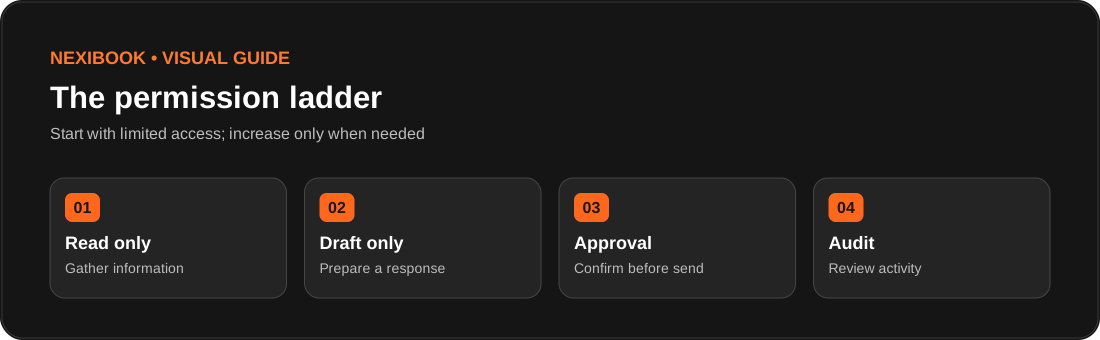
The biggest difference between a chatbot and an agent is often its access to real systems. An agent that reads a public webpage has a different risk level from one that can send emails, delete files, or make purchases.
Start with read-only access and require human confirmation for consequential actions.
Least privilege: Grant only the minimum access required.
Human approval: Require confirmation before sending, deleting, publishing, or spending.
Protect sensitive information: Do not paste passwords or confidential client files into unapproved tools.
Beware of prompt injection: A webpage or document can contain malicious instructions aimed at the agent. Treat outside content as data, not commands.
Keep an audit trail: Record what was requested, which tools were used, and what changed.
Test failures: See what happens when a source is unavailable, an API fails, or the agent is uncertain.
Beginner rule: Start with “research and draft,” not “publish and send.” Add automation permissions only after repeated successful tests.
Common mistakes beginners should avoid
Automating everything at once: Begin with one repeatable, low-risk task.
Trusting every answer: AI can confidently provide incorrect facts and fabricated sources.
Skipping approval steps: Mistakes become more costly when agents can act on external systems.
Ignoring costs: Model usage, workflow executions, connected apps, and hosting may all cost money.
Using too many agents: One well-designed workflow is often easier to manage than a team of agents.
Skipping documentation: Write down what the workflow should do and when it should stop.
Frequently asked questions
Do I need coding skills to use AI agents?
No. Many assistant and automation products offer no-code or low-code workflows. Custom agent frameworks generally require development experience.
Can an AI agent replace an employee?
Agents can assist with parts of jobs, especially repeatable digital tasks. They are not reliable replacements for human judgment, accountability, or all aspects of a professional role.
Can AI agents work while I'm offline?
Some cloud-hosted or scheduled products can continue tasks after you leave. Others require an active session. Check the specific product and plan.
What is the difference between Zapier and an AI agent?
Zapier is an automation platform. It can run fixed workflows and can also support AI-powered or agent-style decisions. A fixed trigger-action sequence alone is not necessarily an autonomous agent.
How much do AI agents cost?
Pricing varies by product, plan, model usage, executions, and integrations. Check current official pricing before subscribing; no price quoted here is guaranteed.
What's the safest first use case?
Researching public information and preparing a draft for your approval is a practical, low-risk way to learn.
Start small, then build smarter
You don't need ten subscriptions or a complicated system to benefit from AI agents. Choose one repetitive task, describe a clear outcome, test it with non-sensitive information, and review the results. Once it works reliably, expand carefully.
Your first action today: Pick one weekly task and create a draft-only assistant. Track whether it actually saves time.
Sources and further reading
Research checked October 2026. Product capabilities may change.
Editorial note: This guide explains documented capabilities and illustrative beginner exercises; it does not claim the author personally tested every tool.
Learn what AI agents are and explore 10 AI tools for 2026. Discover practical use cases, beginner tutorials, automation tips, and essential safety advice. Copy
The tutorial demonstrates these methods inside OpenArt: text-to-video, image-to-video, and Smart Shot. Start with the simplest and add more creative control as you go.